What is a pod in Kubernetes?
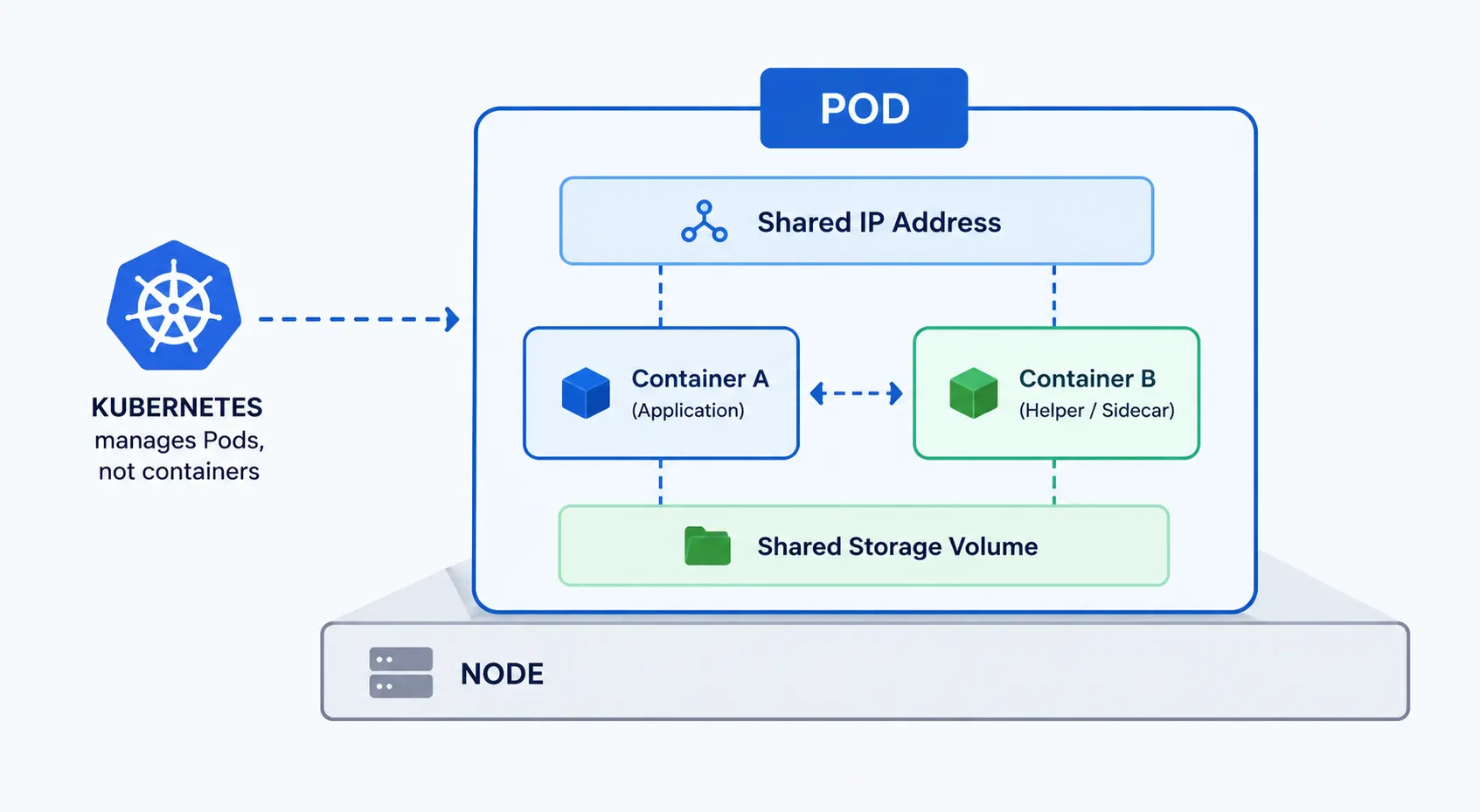
A pod is the smallest deployable unit in Kubernetes. It is a wrapper around one or more containers that need to run together, share the same network, and share storage. Kubernetes manages pods, not containers directly.
How a pod works
Every pod gets its own IP address. If a pod has more than one container, those containers share that IP and talk to each other over localhost.
Containers in the same pod also share storage volumes and are always scheduled on the same node. They cannot be split across machines.
Pods are temporary. When a pod fails or is deleted, Kubernetes replaces it with a new one instead of trying to fix the old one.
Single-container vs multi-container pods
Most pods run a single container. This is the standard setup for a typical application.
Multi-container pods are used when a helper process needs to run alongside the main application, for example a container that collects logs or syncs data. The main container and the helper share resources and start and stop together.
Pod lifecycle
A pod moves through a few defined stages from creation to termination.
- Pending: the pod is accepted but its containers are not running yet, usually because the image is still being pulled or the scheduler hasn’t placed it on a node.
- Running: the pod has been assigned to a node and at least one container is running.
- Succeeded: all containers in the pod finished successfully and will not restart.
- Failed: at least one container ended in failure and the pod is not set to restart.
- Unknown: the state of the pod cannot be determined, usually due to a communication issue with the node.
Kubernetes uses this lifecycle to decide when to restart a pod, replace it, or leave it as is.
Creating a pod
Pods are usually created in one of two ways.
The imperative way uses a direct kubectl command, for example kubectl run my-pod –image=nginx. This is fast and useful for quick tests.
The declarative way uses a YAML file that describes the pod, and you apply it with kubectl apply -f pod.yaml. This is the standard approach for real environments because the YAML file can be version-controlled and reused.
In practice, most teams do not create standalone pods at all. They create a Deployment, which creates and manages pods for them, including replacing pods that fail.
Frequently Asked Questions
What is the difference between a pod and a container?
A container runs a single application process. A pod is the Kubernetes wrapper around one or more containers, and it is what Kubernetes actually schedules and manages.
What is the difference between a pod and a node?
A node is a physical or virtual machine in the cluster. A pod runs on a node. One node can run many pods, but a single pod cannot span more than one node.
Can a Kubernetes pod run multiple containers?
Yes. A pod can run multiple containers that share the same network and storage, typically a main application container plus one or more supporting containers.
Is a pod the same as a container?
No. A container is a single running process. A pod can hold one or more containers and is the unit Kubernetes creates, schedules, and deletes.